Lightning-Fast Edge Deployment with Cloudflare: Building Scalable Backends for Mobile Apps
Build and deploy lightning-fast mobile backends using Cloudflare Workers and Calljmp. Learn how edge backend infrastructure improves latency, scalability, and cost-efficiency for mobile-first apps.

Cloudflare is no longer just a CDN - it’s a global compute platform. With tools like D1, a distributed SQLite compatible database, and Workers that automatically scale and run near your users, it's perfectly suited for powering mobile backends.
Calljmp is built on top of Cloudflare, making it feel native to build and deploy cloud services right alongside your mobile app code.
In this post, we’ll walk through how to get started with Calljmp in just a few steps and show you how to develop and deploy your own cloud service - running globally on the edge.
Getting started with Calljmp
To integrate Calljmp into your React Native project, start with the CLI:
This command bootstraps your project and service module inside a mobile project. After a quick authorization, the CLI connects to your Calljmp dashboard, sets up directories for schema and migrations, and generates TypeScript bindings. You’ll now have a ready-to-edit src/service/main.ts and types for your cloud service logic.
Think of
src/serviceas the home for your backend - co-located with your mobile code, versioned, and deployed globally via Cloudflare.
Your first cloud service
After running calljmp setup, your project will include a scaffolded service entrypoint that looks like this:
This class-based approach gives you a clean and testable way to define server logic.
A quick breakdown
CloudService: A base class provided by Calljmp to simplify request handling and provide typed access to your database, buckets, secrets, and variables.onRequest(): This method is called for every incoming request to your service. You can return aResponsedirectly or useasynclogic as needed.this.database,this.buckets,this.secrets, andthis.variables: Automatically injected helpers for querying D1 (SQLite database), R2 (storage), reading secrets, and accessing environment variables defined in your environment variables.
Managing environment variables and secrets
Calljmp makes it easy to work with environment variables, including encrypted secrets. These variables are defined in .env and .service.env files, and are automatically loaded based on your current environment (e.g., development, production).
Supported files
You can organize them per environment:
.env.env.development.env.production.service.env.service.env.development.service.env.production
The CLI will detect the correct file automatically when you build or deploy.
- Variables prefixed with
SECRET_are encrypted and available in your service as regular variables (without the prefix):CALLJMP_SECRET_ENCRYPTED_TOKEN→this.secrets.ENCRYPTED_TOKEN
- Variables without
SECRET_are available throughthis.variables:CALLJMP_SOME_TOKEN→this.variables.SOME_TOKEN
Calljmp encrypts and manages secrets so you don’t need to worry about leaking sensitive values into your frontend code or mobile apps.
Running your service locally
Once your service is set up, you can start developing and testing it locally using calljmp start. Here's what the output looks like:
This starts a local Cloudflare - compatible server so you can test your service as if it were running in production.
Try It with curl
Your service responds to HTTP requests. The default example returns a simple message:
Multi-device testing
Your service is also available on your LAN (e.g., http://192.168.X.X:8787), which means you can call it from your mobile device for real testing - no tunneling or proxying needed.
This lets you test and debug exactly how your mobile app will communicate with the backend - without leaving your dev environment.
Ready to Build Faster with Calljmp?
Build secure, global, mobile-first apps with zero backend maintenance.
Start building →Creating a simple POST endpoint with Hono
Now let’s add a real endpoint to your cloud service. We’ll use the Hono router to handle requests and return structured JSON.
Updated main.ts
Test it with curl
What you learned
- You can use
Honoto structure routes like an Express app - on the edge. - The Calljmp
CloudServicecontext is still available viac.env.servicefor accessing the database, buckets, secrets, and more. - This sets the foundation for handling user input and building backend logic connected to your mobile app.
You can now expand this into more advanced routes - querying your SQLite database, uploading files to buckets, or handling auth.
Deploying to the edge
Once your service logic is ready, deploy it globally with a single command:
$ calljmp service deployExample output:
Your cloud function is now live and running across Cloudflare’s global edge network.
Viewing your deployed service in the dashboard
Once deployed, you can view your service details, environment variables, and secrets directly from the Calljmp dashboard.
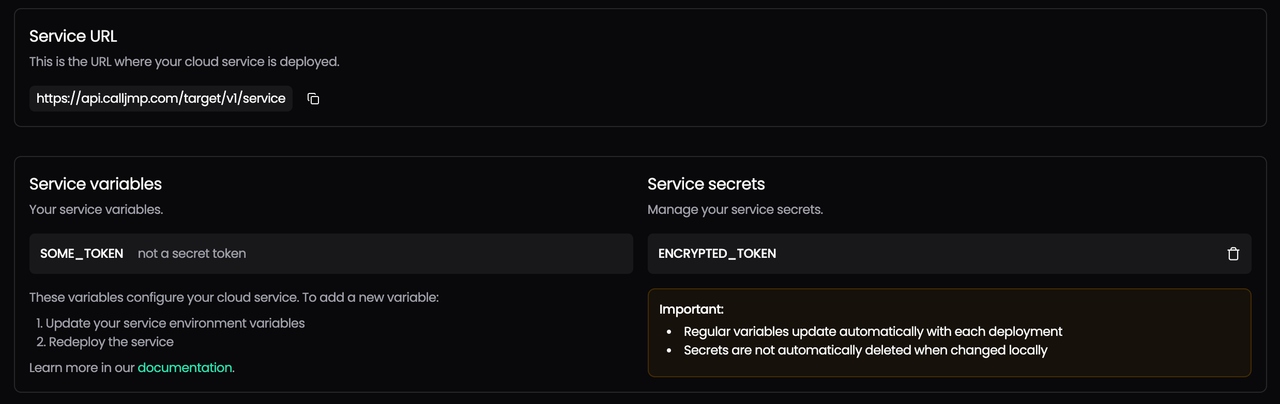
What you see
- Service URL: The public endpoint of your cloud service
- Service variables: Non-sensitive config values like
SOME_TOKENthat are available viathis.variables - Service secrets: Sensitive encrypted values like
ENCRYPTED_TOKENthat are accessed viathis.secrets
Notes
- Regular variables update automatically on each deploy
- Secrets must be updated manually and persist until explicitly removed
- You can manage these by editing your
.envor.service.envfiles and runningcalljmp service deployagain
Keeping secrets and variables separate ensures better security and clarity for your cloud service.
Authenticating requests to production
When your service is deployed, all production requests require authentication to ensure only your mobile app or tools with valid tokens can access it.
Getting an access token
Use the CLI to generate a temporary access token for testing:
$ calljmp service accessThis will output a curl command with all the necessary headers and a valid bearer token:
Testing a protected endpoint
Notes
- The
X-Calljmp-Platformheader identifies the platform (ios,android, etc.) - required. - The
Authorizationheader must include a valid JWT token issued via the CLI or from your mobile SDK. - Tokens are scoped per user/device/session - mobile SDKs manage these automatically in real apps.
Use the CLI token only for testing or server-side scripts. In production, your mobile app should authenticate normally (e.g., email/password, OAuth, etc.) and get its token from the Calljmp auth system.
Wrapping up
In this post, we:
- Bootstrapped a mobile-friendly backend using
calljmp setup - Developed a simple
POSTendpoint usingHono - Tested it locally and deployed it globally to Cloudflare’s edge network
- Secured the production endpoint with access tokens
- Explored environment variables and secrets via the Calljmp dashboard
All of this-with instant edge deployment, native mobile integration, and no infrastructure management.
Calljmp makes building and scaling cloud services for mobile apps feel as natural as writing frontend code.
Ready to Build Faster with Calljmp?
Build secure, global, mobile-first apps with zero backend maintenance.
Start building →