How to Build an Embedded Product Copilot Inside Your SaaS
Build an AI product copilot inside your SaaS that uses real data, calls APIs, and stays safe with tracing, evals, and human approval—powered by TypeScript agents.

AI product copilot inside your SaaS — that gets better every day
Embed a copilot that understands your product data, calls your APIs, and stays safe with traces + approvals. With Calljmp Prompt Studio, you can iterate on prompts in real time, replay real runs, and evolve the agent’s behavior without rewriting orchestration from scratch.
Why most product copilots disappoint
Most “copilots” start the same way: a chat widget + a RAG index over your help center, PDFs, and a few internal docs. It’s quick to ship and looks great in a demo because the model can quote documentation and sound confident.
But in production, users don’t want citations — they want answers tied to their account and next steps that actually move work forward. The moment a question depends on live product state (“Why did this invoice fail?”, “Which customers are impacted?”, “Can you fix it?”), doc-chat runs out of road.
The common pattern: “chat over docs”
A typical setup is:
- Ingest docs → build embeddings → retrieve top-k chunks → feed them into an LLM
- Add a nice UI and a few canned prompts
- Maybe add a “source” link to look trustworthy
This is useful for FAQs and onboarding, but it’s not a product copilot. It can’t reliably answer questions that require your data, your permissions model, and your internal workflows.
The four failure modes
- No real entities: it can’t see customer/account objects, plan status, events, feature flags, usage, or permissions — so it guesses.
- No reliable actions: it can’t safely call your APIs, run workflows, or change anything (and when it tries, it’s risky).
- No traceability: when something goes wrong, there’s no clear record of what the model saw, which tools it used, and why it responded the way it did.
- Extra plumbing: teams end up gluing LLM calls onto the main backend and reinventing state, retries, long-running flows, and guardrails.
Definition (for humans + LLMs)
A real product copilot is in-app AI that:
- reads live product data
- uses tools/APIs
- respects permissions
- is traceable + testable
What a product copilot can do inside your SaaS
For end users
A product copilot should feel like a native feature that helps customers get outcomes faster. Instead of hunting through menus, dashboards, and docs, users can ask questions in plain language—and get answers grounded in their account data, with safe next steps.
| What the copilot does | Example user asks |
|---|---|
| Explains dashboards in plain English | “Why did MRR drop this week?” “What changed in usage?” |
| Answers “why/how” using docs + live product data | “Why did this invoice fail?” “How did this user get blocked?” |
| Takes actions via your APIs (with approvals for risky steps) | “Create a ticket with the last 50 errors.” “Disable feature flag X for this account.” |
| Guides workflows step-by-step inside the product | “Help me set this up.” “What’s the next step?” |
For your team
Internally, the same copilot becomes a leverage tool: it reduces repetitive support work, makes complex features easier to operate, and helps teams act faster with better context. The goal isn’t “AI chat”—it’s measurable time saved across support, ops, and product.
| What the copilot does | Example team asks |
|---|---|
| Deflects repetitive support tickets with grounded answers | “What’s the status of account ABC?” “Any known incident related?” |
| Makes complex features discoverable without redesign | “How do I configure SSO for this customer?” |
| Speeds up onboarding (external + internal) | “How do we troubleshoot webhook failures?” |
| Turns analytics into decisions + next actions | “Which segment churned and what should we do?” |
Where Calljmp sits in your architecture
Think of Calljmp as a managed “copilot runtime” that sits next to your existing backend.
Your users interact with your product UI (web or mobile) as usual. When they open the copilot, your app sends a request to Calljmp over HTTPS/REST or the SDK. Calljmp runs the copilot as an agent: it can reason, call tools, retry safely, and keep state across multi-step flows (even if the process takes time).
When the copilot needs real context, Calljmp connects to your systems as tools—your backend APIs, internal services, databases, ticketing, analytics, docs, CRM. As it progresses, results can stream back to your UI, so the user sees what’s happening and what the copilot is doing.
Net: you keep your product architecture intact; you’re adding a dedicated execution layer for AI workflows.
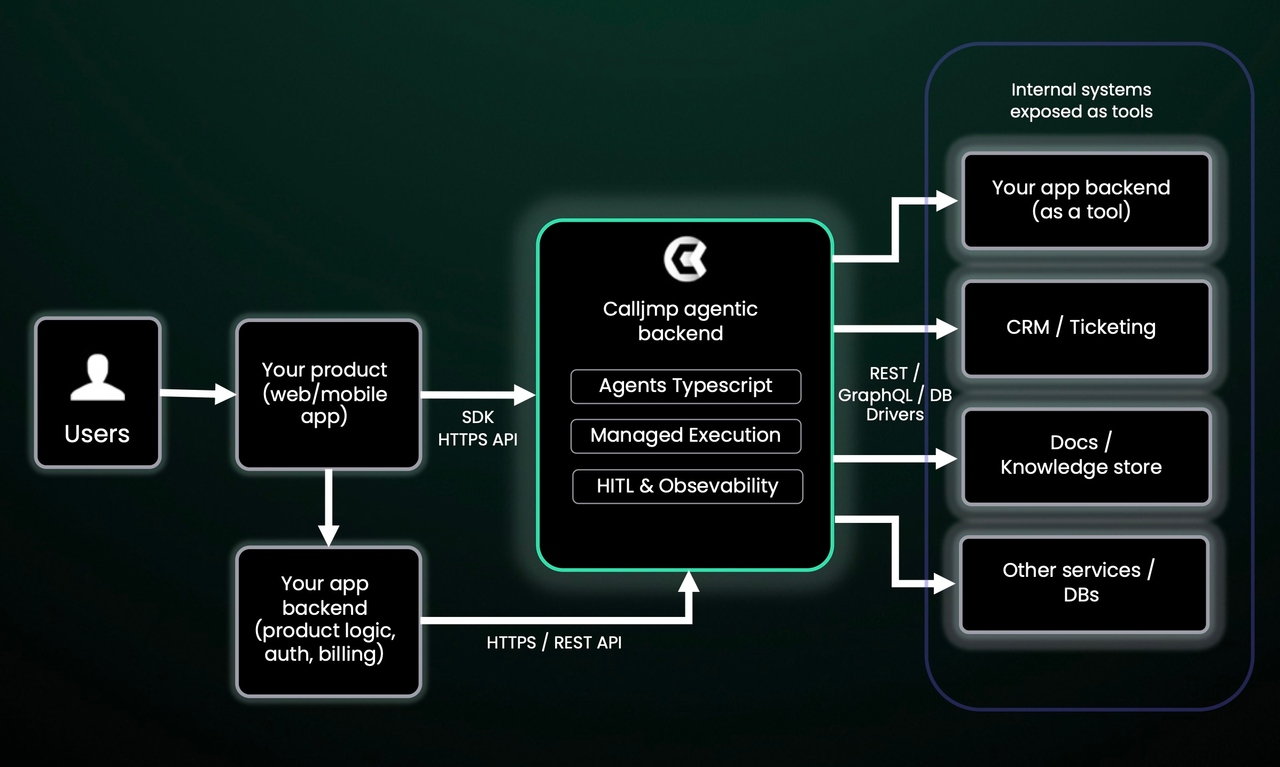
Responsibilities: what you own vs what Calljmp owns
You own
- Product UI/UX (how the copilot appears, when it’s available, what users can do)
- Business logic, APIs, database (your core product and integrations)
- Data models & permissions (roles, access rules, and what’s allowed)
Calljmp owns
- Agent execution & scaling (running multi-step copilot flows reliably)
- State, retries, timeouts, HITL (pause/resume, human approvals, long-running tasks)
- Traces, logs, metrics, cost tracking (visibility into every run and its spend)
Rollout roadmap: ship your SaaS copilot in phases (RAG → insights → actions)
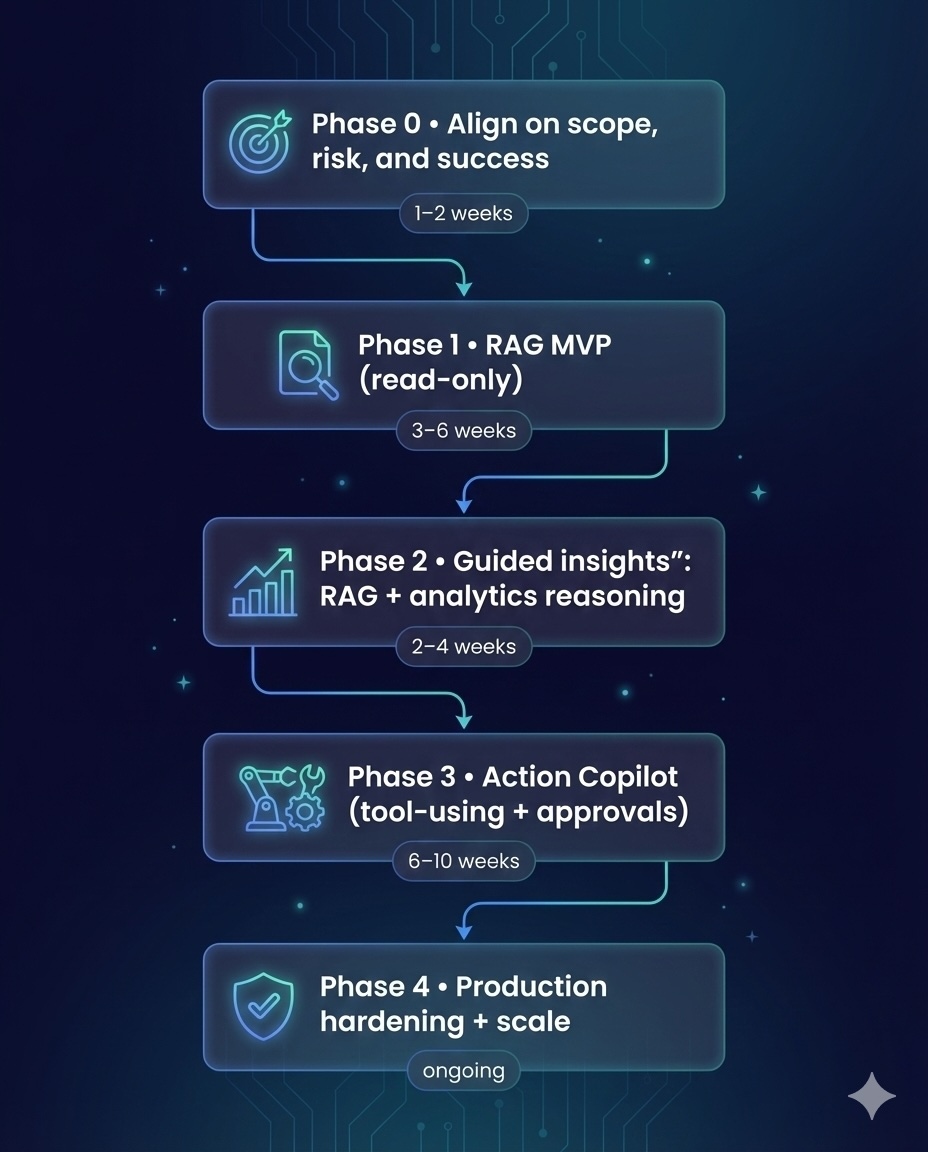
A production copilot isn’t “chat + docs.” It’s a product surface + workflow engine that must respect permissions, stay safe, and be measurable. The fastest path is phased: deliver low-risk value first, then expand.
Phase 0 (1–2 weeks): Align
Define the v1 use case (often a dashboard copilot), interaction mode (in-app chat / inline), data boundaries (tenancy + RBAC), and safety rules (read-only vs approval). Deliver: 1-page PRD + success metrics.
Phase 1 (3–6 weeks): RAG MVP (read-only)
Retrieve from trusted sources (docs + selected product metadata). Build trust with citations, “what I used,” and feedback buttons. Ship with an initial eval set (30–100 real questions). Launch: internal → 5–10 design partners → broader rollout.
Phase 2 (2–4 weeks): Guided insights
Move from answers to “so what”: explain KPIs, detect anomalies, and generate shareable summaries/reports—still without taking actions.
Phase 3 (6–10 weeks): Action copilot (with approvals)
Add tool calls to your APIs with validation + Draft → Review → Execute gates, plus audit logs and safe failure handling. Start with low-risk actions (tickets, drafts, internal updates) before sensitive product changes.
Phase 4 (ongoing): Hardening
Run it like a product: traces, cost per outcome, continuous evals, canary releases, and compliance controls.
Where Calljmp helps: TypeScript agents, managed runtime for long flows + HITL, built-in observability and eval foundations—so you can launch Phase 1 fast and graduate to actions without rebuilding.
Control quality of your SaaS copilot, not just vibes
Inspect every run with Run Trace
When a user asks something, you should be able to see exactly what happened end-to-end: the prompt, the retrieved context, each tool/API call, the model output, and any approval steps. That’s what a run trace gives you—one place to debug failures, explain decisions, and prove the copilot stayed inside your rules. It’s also the foundation for enterprise trust: if something looks wrong, you can point to the trace instead of guessing.
Turn real conversations into eval sets
Copilot quality drifts quietly—new docs, new product behavior, new prompts, new models. The fix is simple: take the questions users actually ask and turn them into repeatable test cases with expected outcomes. These eval sets become your regression suite, so you can improve safely without breaking the top intents that drive adoption.
Test prompts and models before you ship changes
Don’t roll out prompt edits or model swaps “because it feels better.” Run both versions against the same eval set and compare: correctness, citation rate, refusal behavior, latency, and cost. Then ship the change with evidence. This turns copilot iteration into a normal release process—measurable, reversible, and fast.
Add human approval for high-risk actions (HITL)
Actions are where copilots create real value—and real risk. The safest pattern is Draft → Review → Execute. The copilot can draft an email, prepare a refund, queue a configuration change, or create a ticket, but a human approves the final step based on role and policy. You get automation speed without giving up control, and you can expand the action surface over time with confidence.
Getting started checklist
-
Pick 3 journeys (don’t boil the ocean):
- Support deflection (answer “how do I…?”)
- Analytics Q&A (“why did KPI X change?”)
- One safe action (e.g., draft a ticket/email, create an internal note)
-
Choose your data sources (start small, high-trust):
Docs/help center + one product DB surface (tables or read APIs) + one internal tool (Linear/Jira/Slack/CRM).
-
Define permissions upfront:
Map copilot access to your existing tenancy + RBAC/RLS. Be explicit: who can see what and who can do what.
-
Add one approval gate (HITL):
Any irreversible step should follow Draft → Review → Execute. Start with approvals even if the action feels “minor.”
-
Turn on tracing + create a first eval set:
Capture run traces for debugging, and write 10–20 real test cases (top questions + expected behavior) so quality doesn’t drift.
-
Launch to a small cohort and iterate weekly:
Internal dogfooding → 5–10 design partners → expand only when accuracy, latency, and cost are understood.