Solutions for AI Agent Security: How to Protect Data, Tools, and Workflows in Production
Learn how to secure AI agents in production - identity, permissions, data protection, and HITL workflows. Practical TypeScript patterns and checklist.

Finding the right solutions for AI agent security is one of the most underestimated challenges teams face when moving from prototype to production. It's easy to miss because the early signs are invisible — your agent works, the demo is impressive, and the security gaps only surface when something goes wrong in a live environment.
The core problem is that traditional web security was designed for stateless request-response cycles. You authenticate the user, authorize the action, return the result. An agent that runs a five-step workflow, queries your database, calls an external API, and sends a Slack notification on your behalf is a fundamentally different threat surface. It can be manipulated mid-run, cause damage across multiple systems, and produce effects that are difficult or impossible to reverse — all without a human reviewing what happened.
This guide covers the four security domains every team shipping production AI agents needs to address:
- Agent identity — who or what is acting, and how do you verify it?
- Permission management — what can the agent do, and how do you enforce limits in code?
- Data protection — what does the agent see, store, and send to LLM providers?
- Enterprise security tooling — what does a production-grade agentic security stack actually look like?
Solutions for AI Agent Identity
Identity is the foundation of agent security. Without knowing precisely what is acting at any given moment, you cannot enforce permissions, write meaningful audit logs, or investigate incidents after they happen.
Agent Identity Is Not User Identity
This is the most common conceptual mistake teams make. A user authenticates once. The agent acts many times on their behalf, often across systems the user never directly interacts with. Those are different identity claims that require different mechanisms.
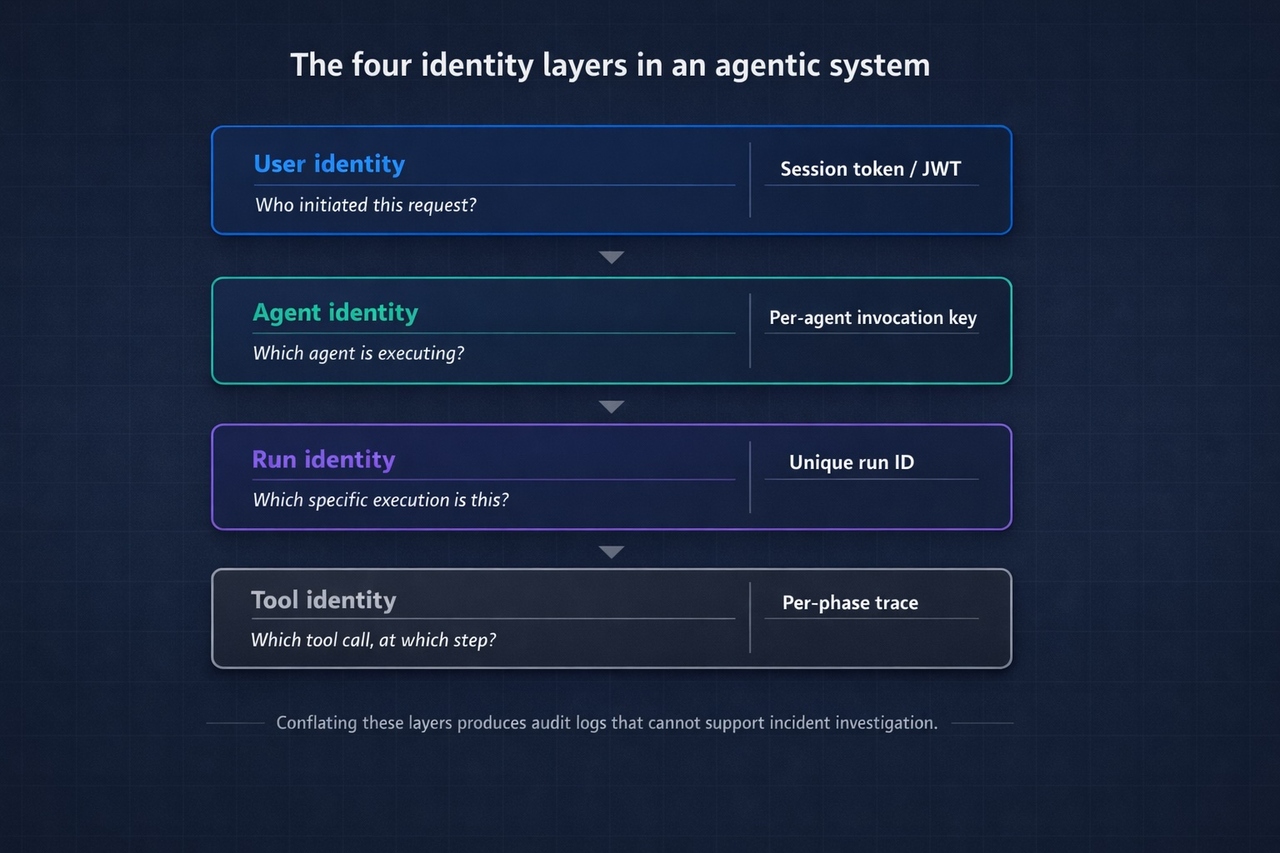
In a typical agentic workflow, there are at least four distinct identity layers:
| Identity Claim | What It Answers | Mechanism |
|---|---|---|
| User identity | Who initiated this request? | Session token / JWT from your auth layer |
| Agent identity | Which agent definition is executing? | Per-agent service credential |
| Run identity | Which specific execution is this? | Unique run ID per invocation |
| Tool identity | Which tool call happened at which step? | Per-phase trace with scoped context |
Conflating these layers is how you end up with audit logs that tell you someone did something, but not which agent run triggered it, which tool was involved, or whether the right agent acted on the right user's behalf.
Authenticating Agent-to-Backend Calls
When a trusted backend service invokes an agent for data processing, LLM generation, or workflow execution, the invocation should use a dedicated credential that identifies the specific agent, not a generic service account shared across your infrastructure.
The pattern:
Key practices:
- Issue per-agent credentials, not one shared key across all agents
- Rotate credentials on a regular schedule and immediately on suspected compromise
- Restrict invocations to internal IPs or VPCs where possible. A leaked key that can only be used from inside your network is a contained leak
Authenticating Web-Facing Agents
Web-facing agents (e.g., an in-app copilot) have an additional constraint: the invocation originates from a browser, where secrets cannot be stored safely. The correct architecture separates concerns:
- The browser authenticates the user via your existing auth layer
- The browser calls your backend, which validates the session
- Your backend invokes the agent using a server-side credential
- The agent runtime returns results through your backend to the browser
Any architecture that puts an agent invocation key in client-side JavaScript (even obfuscated) has a credential exposure problem. The key will be found.
Run-Level Traceability
For long-running workflows, you need to verify that each step belongs to the same coherent execution. Assign a unique run ID to every agent invocation and propagate it through every tool call and workflow phase. When an incident occurs, you need to reconstruct the sequence: what input triggered this run, which tool was called at step 3, what it returned, and what happened next.
Without run-level IDs, incident investigation in agentic systems is guesswork.
Leading Methods for Managing AI Agent Permissions
Once agent identity is established, the question becomes: what is this agent allowed to do? In most production deployments the honest answer is: far more than it should.
The Overpermission Problem
Developers building agentic systems for the first time give agents broad access because it's faster. The agent needs to read user records, so it gets access to the entire users table. It needs to send a notification, so it gets access to the full notifications API. It needs one endpoint, so it gets a key with full API scope.
In development, this is a productivity pattern. In production, it means a single compromised run or a single successful prompt injection can cause damage well beyond the scope of the intended task.
The principle to apply: least-privilege at the tool level. Define the minimum access each tool needs, enforce it in the tool implementation, and verify it at the point of execution.
Define Permissions in Code, Not at Runtime
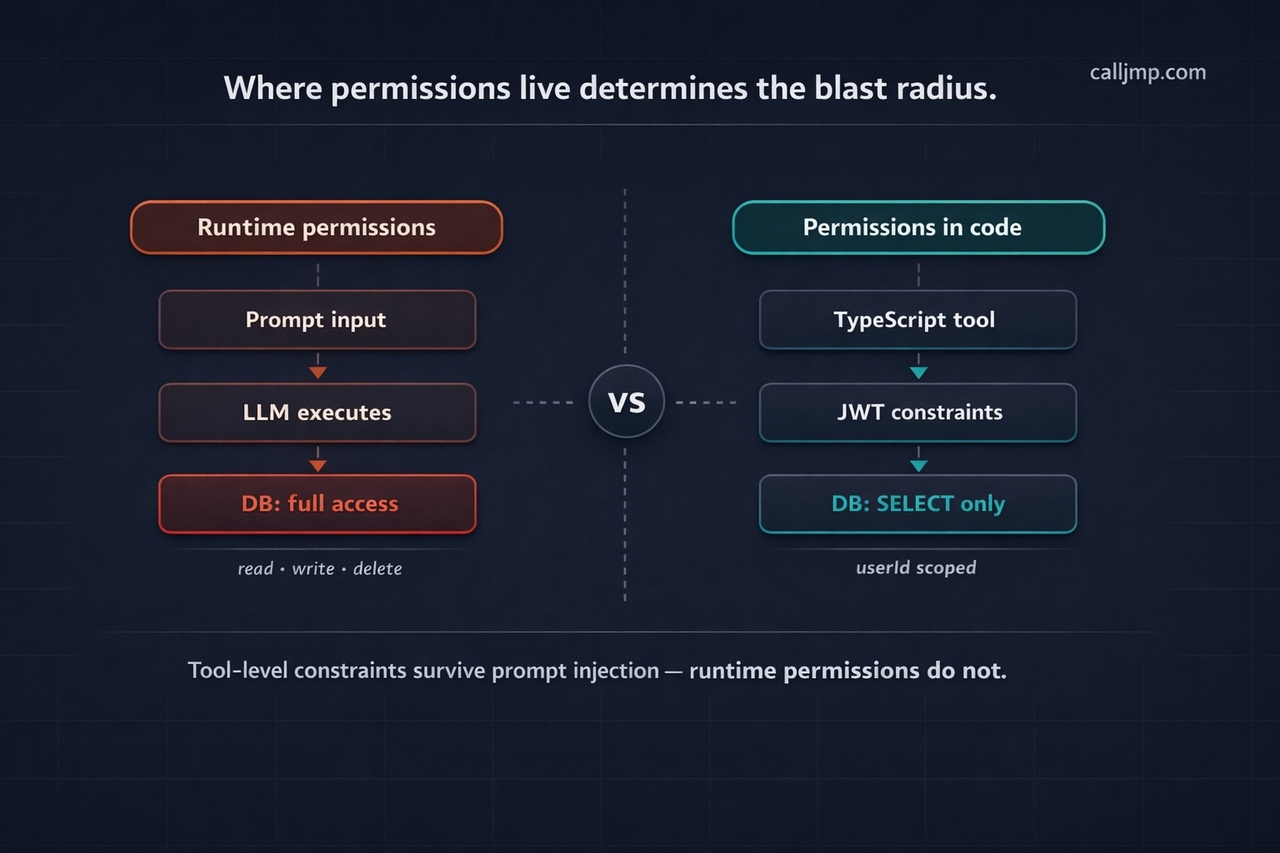
Where permissions live is an architectural decision with significant security consequences. If permissions are configured at runtime => passed as inputs, read from environment variables, or derived from prompt context => they can be manipulated. If they're defined in the tool implementation in TypeScript, version-controlled and deployed as code, they're significantly harder to subvert.
A robust pattern for database access tools uses short-lived JWTs that encode Row-Level Security constraints directly:
Even if the LLM is manipulated into attempting an unauthorized query, the JWT claims prevent execution at the tool level.
Prompt Injection as a Permissions Problem
Prompt injection (where user-supplied input tricks the agent into executing unintended tool calls) is fundamentally a permissions failure as much as an input validation failure. If the agent only has the permissions it needs for the task, a successful injection is contained. A malicious instruction to "delete all records" can only succeed if the agent has delete permissions.
Defense is layered:
Layer 1 — Constrain permissions first. Make the worst-case injection consequence minimal before worrying about detection.
Layer 2 — Scan inputs before LLM calls. For agents that process untrusted external input (user queries, scraped data, email content), add an explicit validation phase before the LLM sees anything:
Layer 3 — Conservative generation parameters. Set maxIterations on multi-step tool use (5 is a reasonable ceiling for most tasks), and use toolChoice: 'auto' rather than forcing the model to always call a tool. These constraints limit how far a successful injection can propagate.
Permission Scope Reference
| Permission Type | Correct Location | Anti-Pattern |
|---|---|---|
| Data access (tables, columns) | Short-lived JWT with RLS constraints | Agent input or env variable |
| API scope | Tool-level credential | Single key shared across all tools |
| Operation type (read vs. write) | Defined in tool execute function | Inferred from prompt context |
| User-specific access | Scoped by userId in tool logic | Open retrieval across all users |
Data Protection for AI Agent Usage
Agents need real data to be useful. They query databases, retrieve documents, access user context, and pass information to LLM providers. Every one of those data flows is a potential exposure point.
Scoped Retrieval, Not Broad Access
The first principle: the agent should only receive the data it needs for the current step, not everything it might theoretically need for the entire workflow.
In practice, most RAG and memory implementations retrieve broadly and let the LLM sort out relevance. This is a data leakage pattern. Context windows filled with data outside the user's scope expose that data to the LLM provider, increase cost, and degrade output quality simultaneously.
Enforce retrieval scope in code:
The constraint should be in the retrieval call, not a post-processing filter. If you filter after retrieval, you've already sent the wrong data to the embedding model.
What Happens to Data Sent to LLM Providers
When your agent calls an LLM provider, that provider receives everything in the context window — the system prompt, the user input, tool outputs, and retrieved documents. This is the data exposure question most teams don't ask until a compliance conversation forces it.
Before production, answer these explicitly:
- Does the provider retain prompts for training by default? What's the opt-out mechanism?
- What's the data residency policy? Which regions does data transit?
- Is there a data processing agreement (DPA) in place?
- For enterprise customers: does your LLM provider relationship cover their data, or does it require separate agreements?
The cleanest architectural solution is routing LLM calls through your own provider credentials (BYOK = bring your own key). The data stays inside your existing provider relationship and DPA. No third-party runtime sees it. This matters less for consumer products and significantly more for any B2B SaaS handling customer data.
Secrets Management in Agent Code
The most common data protection failure in agentic systems is secrets appearing where they shouldn't:
- Hardcoded in agent code (visible in version control)
- Passed as agent inputs (logged in observability traces, often retained for 90 days or more)
- Written into workflow outputs (persisted in run history)
The correct pattern uses a dedicated secrets store that injects values at runtime without exposing them to logs:
If passing sensitive data as input is unavoidable for your architecture, encrypt it before sending and decrypt inside the agent. Do not rely on the agent runtime to handle this — it's your responsibility at the application layer.
Data Protection Checklist
- RAG and memory queries filtered by user context at the retrieval call, not post-processing
- No secrets in agent code, inputs, or prompt templates
- Agent inputs audited for sensitive data — check what your runtime logs and for how long
- LLM provider data retention policy reviewed and documented
- BYOK configured for regulated data or enterprise customer deployments
- Context window audited per workflow step — agent receives only what it needs
AI Agent Security Tools for Enterprise
Individual security patterns matter. But at scale — multiple agents, multiple teams, multiple customers — you need infrastructure that enforces security by default, not by developer discipline.
Human-in-the-Loop as a Security Control
HITL is typically discussed as a UX feature. For security, it's better understood as a risk gate for irreversible actions.
Any action that cannot be undone — sending an email, deleting a record, initiating a payment, posting to an external system — should require explicit human authorization before execution. This is the agentic equivalent of requiring two signatures on a large transaction. The agent may have made the right decision. The requirement is that a human confirms it before the consequence is permanent.
Implementation requires a runtime that supports genuine pause-and-resume:
The critical requirement: the pause-resume-audit cycle must be guaranteed by the runtime, not implemented at the application layer. Application-level HITL gets bypassed under deadline pressure. Runtime-level HITL cannot be.
Observability as a Security Requirement
Observability in agentic systems is not a debugging convenience — it's a security requirement. Without complete execution traces, incident investigation is impossible.
"The agent did something wrong" is not actionable. "At step 3 of run run_abc123, tool queryOrders was called with parameter userId: undefined, returning 847 records across all users" is actionable.
Production agent observability for security requires:
| Capability | Why It Matters for Security |
|---|---|
| Per-step execution trace | Reconstruct exactly what happened and in what sequence |
| Tool call logging with inputs and outputs | Identify which tool was misused and with what parameters |
| Run-level cost and token tracking | Detect runaway or anomalous agent behavior |
| User-scoped attribution | Tie every action to the correct user and run |
| Anomaly alerting | Catch issues before they cause significant damage |
Publish security-relevant events from within workflows for real-time monitoring, rather than relying purely on post-hoc log review:
Operational Security: The Controls Teams Skip
Cost caps and rate limiting. A runaway agent is a security vector, not just a reliability issue. Repeated agent invocations can exhaust budget, cause denial of service, or — in adversarial cases — exfiltrate data incrementally through many small LLM calls. Configure hard limits per agent and alert before you reach them.
Environment separation. Production agents must not share configuration, credentials, or invocation keys with development or staging. This is routinely violated when teams move fast. Make it a deployment requirement, not a best practice.
Prompt and model versioning. A system prompt change is a code change with security implications. A prompt that previously constrained the agent to read-only operations may allow write operations after a careless edit. Treat prompt changes with the same review process as application code: pull request, review, test, deploy.
Credential rotation. Rotate agent invocation keys on a defined schedule. Document the rotation process before you need to execute it under incident conditions.
What a Managed Agentic Runtime Gives You
Building these security controls from scratch on a DIY orchestration layer is possible. It's also a significant ongoing maintenance burden — identity, secrets management, HITL, observability, and cost controls are each non-trivial to implement correctly, and they interact with each other in ways that create gaps when built independently.
Managed agentic backends like Calljmp implement these as platform primitives: per-agent invocation keys, Vault-based secret injection, first-class HITL with pause/resume, per-run observability traces, and usage-based cost metering — all available from day one without infrastructure setup. The tradeoff is the usual one for managed services: less control over the implementation, in exchange for not building or maintaining it.
For teams whose core product is not AI infrastructure, that tradeoff is usually correct. The security properties you get from a platform that's built them once and maintains them across all customers are more reliable than the same properties built once by an application team under feature pressure.
What to Ask Any Agentic Backend Provider About Security
Whether you're evaluating Calljmp or any other platform, these questions separate genuine security posture from surface-level claims:
- Is HITL a native runtime primitive, or an application-level concern?
- Are tool permissions enforced at the runtime level or defined at runtime by the application?
- Where do secrets live — can they appear in logs or execution traces?
- What is the data retention policy for agent inputs and outputs?
- Is BYOK supported for LLM calls?
- Can you reconstruct a complete execution trace for any specific run?
- Are there configurable cost caps per agent?
AI Agent Security Checklist for TypeScript Developers
Before deploying any agent to production. Vendor-agnostic — applies regardless of which runtime or orchestration layer you use.
Identity
- Agent invocation credentials stored in environment variables or secret manager — never hardcoded
- Per-agent credentials issued, not one shared key across all agents
- Credentials rotated on a defined schedule; rotation process documented
- Web-facing agents use server-side credential management. No keys in client-side code
- Unique run IDs assigned and propagated through all workflow phases
Permissions
- All tool permissions defined in TypeScript code. Not passed at runtime
- Database tools use short-lived JWTs with RLS constraints (tables, columns, operations)
- Tool access scoped to minimum required operations (read vs. read/write explicit)
- Workflow phases scoped by userId for per-user traceability
- Input validation phase runs before LLM calls on untrusted input
- maxIterations configured on LLM calls — no unbounded tool use loops
Data Protection
- All secrets managed via vault/secret store. Not in code, inputs, or prompts
- RAG and memory queries filtered at retrieval time, not post-processing
- Agent inputs audited for sensitive data. Know how long your runtime retains them
- LLM provider data retention and residency policy reviewed and documented
- BYOK configured for regulated data or enterprise customer deployments
Workflow Integrity
- HITL gates on all irreversible actions: sends, deletes, payments, external posts
- Retry logic configured with safe failure behavior (idempotent operations where possible)
- Security-relevant events published from workflows for real-time monitoring
- Workflow phases named clearly for readable audit traces
Operations
- Cost caps and usage alerts configured per agent
- Production environment fully separated from dev/staging (credentials, config, project)
- System prompt changes reviewed as code changes, not edited directly in production
- Anomalous run behavior monitored via observability dashboard
Security Is an Architectural Decision, Not a Feature Flag
Most agentic security debt doesn't come from developers ignoring security — it comes from building on infrastructure that makes insecure patterns easy and secure patterns laborious.
When agents are defined as TypeScript code on a runtime with built-in identity, permissions, and observability, security properties become code properties: reviewable, testable, versioned, and deployable through the same process as everything else. When agents are ad-hoc scripts or visual workflows with security bolted on afterward, those properties become a discipline problem dependent on every developer making the right choices, every time, under pressure.
The patterns in this guide aren't aspirational. They're what production agents require. The question is whether you build them yourself or build on a runtime that provides them by default.
People also ask: AI agent security in production
1. What is the difference between user identity and agent identity? User identity answers who initiated a request — established once via session token or JWT. Agent identity answers which agent is executing on that user's behalf — a separate per-agent credential. Conflating them means audit logs can tell you a user triggered something, but not which agent acted or which tool call caused damage.
2. Why isn't defining permissions at runtime sufficient for AI agent tool access? Runtime permissions — passed as inputs or derived from prompt context — can be manipulated via prompt injection. Permissions defined in TypeScript tool code, verified via short-lived JWTs at execution time, cannot be overridden by the LLM regardless of what it was instructed to do.
3. What data protection risks arise when AI agents call LLM providers? Everything in the context window — prompts, user inputs, tool outputs, retrieved documents — is sent to the provider and may be retained by default. The cleanest mitigation is routing LLM calls through your own provider credentials (BYOK), so data stays inside your existing data processing agreement.
4. What is HITL and why is it a security control, not just a UX feature? Human-in-the-loop (HITL) is a runtime gate that pauses agent execution before irreversible actions — sends, deletes, payments — and waits for explicit human approval. As a security control it limits blast radius: even a compromised or manipulated agent cannot complete a destructive action without a human confirming it first.
5. What is the most common data protection failure in production AI agent systems? Secrets appearing where they shouldn't — hardcoded in agent code, passed as inputs that get logged, or written into workflow outputs. The correct pattern is a dedicated vault that injects secret values at runtime without ever exposing them to logs, traces, or run history.