AI Dashboard Architecture: How to Build a Copilot Across Frontend, Backend, and Knowledge Base
Build an AI dashboard copilot that streams to the UI, calls backend tools, and stays grounded. The three-surface architecture for production teams, with code.

An AI dashboard copilot is an in-product assistant that lets users ask questions in plain language, get answers grounded in their live account data, and take actions without leaving the dashboard. Building one that survives production is harder than the demo suggests, because a real copilot has to coordinate three surfaces at once: the frontend the user is watching, the backend that holds product data and APIs, and the knowledge base that grounds its answers. This article breaks down that coordination problem, why most teams underestimate it, and the AI dashboard architecture that makes a copilot reliable enough to ship.
One note on scope. This is about embedding an AI copilot inside a SaaS product's dashboard. It is not about AI-powered analytics dashboards that visualize metrics, and it is not about observability dashboards for monitoring AI agents. The subject here is the copilot itself, and the architecture behind it.
Why most AI dashboard copilots fail in production
Most AI dashboard copilots fail not because the language model is weak, but because the architecture around it cannot coordinate the surfaces a copilot depends on. The components work in isolation. The integration does not.
A fintech CTO came to us in early Q1 building an in-product copilot for a white-label trading platform. The goal sounded simple. When a trader hovers on an instrument like NVDA or BTC-USD, a popup explains the instrument in plain language, pulls in live price stats, surfaces relevant news, and lets the user ask follow-up questions like "why did this spike yesterday?" or "what's the technical setup right now?"
They had a v1 working in about three weeks. Vercel AI SDK for streaming tokens to the popup. Pinecone for the news and analyst-report index. A Node service that hit their internal market data API. On the happy path it looked great in a demo.
Then the integration problems started. On the second turn of a conversation, the agent would forget which instrument the user was looking at. The frontend knew, but that context was not flowing back to the agent. They patched it by sending the full UI state with every message. Token costs jumped roughly 40% overnight.
Then tool calls started misbehaving. The agent would call the market data tool, get a clean response, then answer from its own pretraining anyway. The CTO could not tell from the logs whether the tool result was ignored, malformed, or never reaching the model. Traces were split across three places: Vercel for streaming, Pinecone for retrieval, and their backend for tool calls. Stitching them together by request ID took about 20 minutes per debug session.
After six weeks the demo worked maybe 70% of the time. The CEO wanted production by quarter end. The CTO told the team to stop and talk to us before shipping anything else.
This pattern is not unique to fintech. The data backs it up. MIT Sloan and BCG's November 2025 survey of 2,102 executives found that 35% of organizations are already exploring agentic AI, with another 44% planning to deploy soon, an adoption pace that is outrunning the architecture and governance needed to operate these systems (MIT Sloan + BCG, 2025). Gartner put a number on what happens when adoption races ahead of readiness: it predicts more than 40% of agentic AI projects will be canceled by the end of 2027, citing escalating costs, unclear business value, and inadequate risk controls (Gartner, 2025). The trading platform team was on track to become one of those canceled projects, and the root cause was architectural.
What is an AI dashboard copilot (and what it is not)
An AI dashboard copilot is in-product AI that reads live product data, calls your APIs through tools, respects your permissions model, and is fully traceable. It is a product surface, not a chat widget bolted onto a help center.
The distinction matters because the easy version is misleading. A chat box with retrieval over your docs ships in a few days and demos well, because the model can quote documentation and sound confident. But the moment a question depends on live product state ("why did this invoice fail?", "which customers are impacted?", "can you fix it?"), doc-chat runs out of road. Users do not want citations. They want answers tied to their account and next steps that move work forward.
A genuine AI dashboard copilot does four things a chat box cannot:
- Reads real entities: accounts, usage, plan status, events, feature flags, permissions.
- Calls your APIs safely, with approvals for risky actions.
- Stays grounded in your knowledge base rather than guessing.
- Produces a trace for every run, so you can debug failures and prove the copilot stayed inside its rules.
The trading platform's popup was trying to be exactly this kind of copilot. The architecture they built around it was not.
The three-surface problem: frontend, backend, and knowledge base
The three-surface problem is the core architectural challenge of any AI dashboard copilot: the agent has to coordinate three surfaces that run on incompatible time horizons, and the integration between them is where production copilots break.
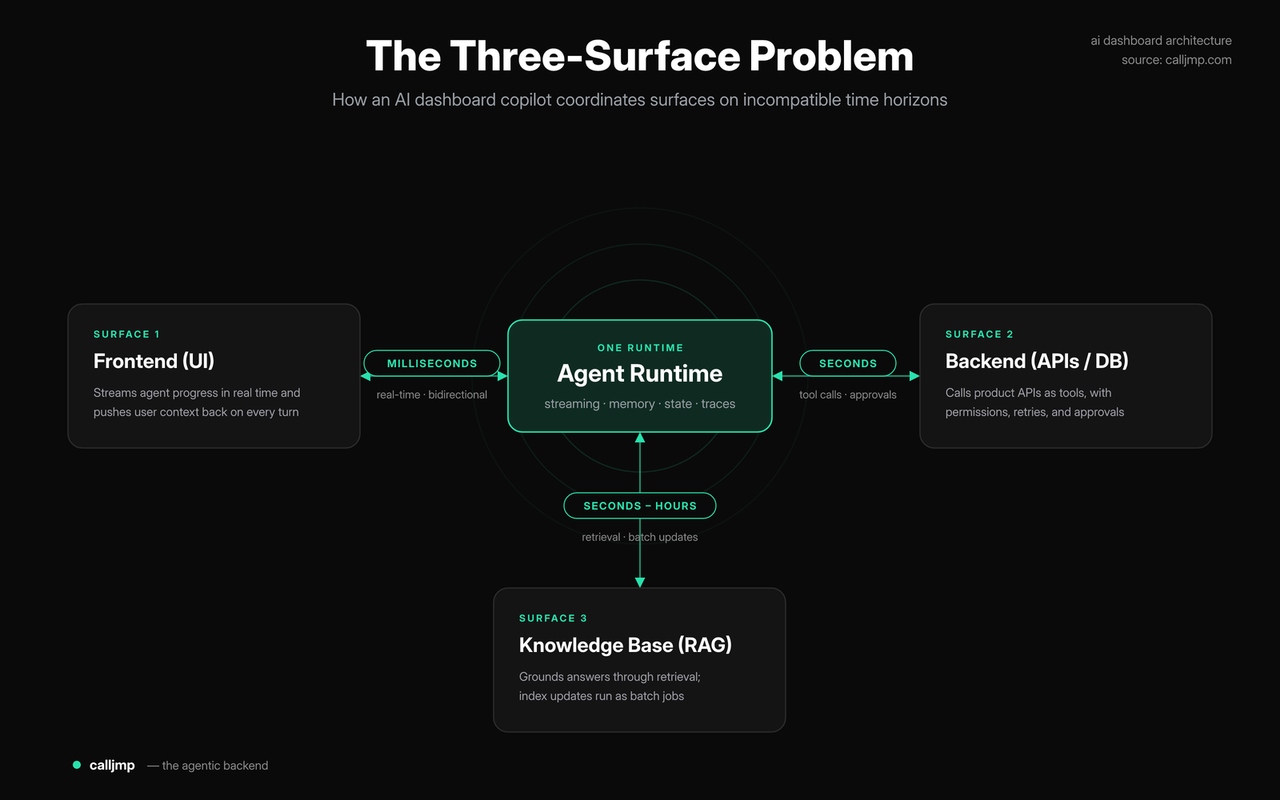
Surface 1: the frontend and the agentic UI
The frontend is the surface the user is watching, and it operates in milliseconds. A good agentic UI streams progress as the agent works: which tool it is calling, what it found, partial results, and a final answer. When the trading platform's popup sat spinning with no feedback, users assumed it had crashed. The frontend is not just an output target for an agentic UI. It needs continuous, real-time updates from the agent and it needs to push the user's current context (which instrument they are viewing, what filters are applied) back to the agent on every turn. Most agentic UI implementations only get the first half right.
Stop building AI agents around a single model
Route each agent task to the right model — frontier where it matters
Launch AI assistant →Surface 2: the backend and AI integration with product data
The backend is where your product data, business logic, and permissions live, and it operates in seconds. This is where AI integration with your existing systems gets real. The agent calls your APIs as tools to read account state and execute actions. It has to inherit your existing role-based access control, validate inputs, handle retries, and gate risky actions behind approvals. The trading platform's AI integration looked clean from the outside, but the agent called the market data tool correctly and then ignored the result, a failure that lives entirely in this surface and is invisible without a unified trace. The lesson: serious AI integration is not "the agent can call APIs," it is "the agent calls APIs, uses the results, and you can prove both happened." (For a deeper treatment of this surface, see why production agents need a separate backend.)
Surface 3: the knowledge base and AI features that stay grounded
The knowledge base is the surface that grounds the copilot's answers, through retrieval over docs, analyst reports, news, or internal context. Retrieval is fast and usually the most reliable of the three surfaces in isolation. The difficulty is not getting good chunks back. It is making sure the agent actually uses what it retrieved, and combines it with live backend data rather than choosing one or the other. Strong AI features in a copilot depend on this surface staying grounded turn after turn. The trading platform's AI features looked impressive in demos because the news index was high quality, but in production the agent would sometimes summarize stale or unrelated articles when it should have called the live market data tool first. Grounding the AI features in the right source at the right step is a coordination problem, not a retrieval problem. (For the deeper RAG mechanics behind this surface, see our guide on enterprise RAG engineering.)
Why an AI agent UI is a live system, not a request-response endpoint
A production AI agent UI is a live system: a continuously running, stateful service that coordinates four behaviors at once, rather than a function that takes a request and returns a response. This is the single most important mental shift for teams building a real AI agent UI on top of an LLM.
A request-response model assumes the agent does its work in one shot and forgets everything afterward. Real copilots do not work that way. They need four things working together:
| Behavior | What it means | What breaks without it |
|---|---|---|
| Real-time | Agent streams progress and partial results to the UI as it works | UI freezes; users think it crashed |
| Bidirectional | UI pushes current context back to the agent on every turn | Agent forgets what the user is looking at |
| Memory | Short-term (conversation), long-term (account, prior runs), and procedural (which tools worked) hydrate automatically | Context is re-sent every turn; costs spike |
| State | Agent survives multi-step flows, refreshes, and human approvals | Long-running or HITL flows drop and restart |
The trading platform hit three of these four failures at once. The agent forgot the instrument (no bidirectional context). Costs jumped 40% because they re-sent everything every turn (no managed memory). And they could not pause for a "place a trade" approval without dropping the connection (no durable state across human-in-the-loop pauses). Each problem looked separate. They were all symptoms of treating a live system like a request-response endpoint.
Most agent platforms ship one or two of these behaviors as primitives and leave the rest as integration work. A streaming SDK gives you real-time but no memory or state. A framework gives you orchestration but expects you to host the runtime, manage the WebSocket layer, and stitch in a vector store yourself. The four behaviors get built as four separate systems, which is exactly how you end up with traces scattered across three vendors and an AI agent UI that works in a demo but not in production.
What breaks when you stitch the three surfaces yourself
When teams build the three surfaces separately, the failures are predictable and they compound. The components are fine. The seams are where everything goes wrong.
- Context does not flow back. The frontend knows the user's state, but there is no clean channel to push it to the agent mid-conversation. Teams patch this by stuffing full UI state into every prompt, which inflates token costs. The trading platform saw a 40% jump this way.
- Tool results get ignored or lost. Without a unified execution layer, you cannot reliably tell whether a tool was called, what it returned, and whether the model used the result. Debugging means correlating logs across systems by request ID.
- Traces are split across vendors. Streaming logs in one place, retrieval logs in another, tool-call logs in your backend. A single conversation has no single source of truth. The trading platform spent about 20 minutes per debug session just reassembling what happened.
- Human-in-the-loop drops the connection. Pausing an agent for approval means holding state across an arbitrary wait, then resuming and reconnecting the stream. Bolt-on architectures rarely handle this, so the UI hangs.
- State is reinvented from scratch. Long-running flows need durable execution, retries, and timeouts. Teams end up gluing Postgres, Redis, and a vector store together and owning every bug in the seams.
This is the hidden cost behind Gartner's cancellation prediction. Projects do not fail because the model cannot answer questions. They fail because the surrounding system cannot be operated, debugged, or trusted in production. The three-surface problem is not an exotic edge case. It is the default state of any AI dashboard copilot built without a coordinating runtime.
The architecture that works: one runtime, three coordinated surfaces
The architecture that works treats the four behaviors as one runtime rather than four integrations. The agent, the real-time channel, the memory layers, and the state machine all live in the same execution layer and coordinate by default.
Anthropic's guidance on building effective agents draws a useful distinction here: workflows follow predefined code paths, while agents dynamically direct their own tool usage and maintain control over how they accomplish a task (Anthropic, 2024). A dashboard copilot is squarely in agent territory. It decides when to query the knowledge base, when to call a backend tool, and when to stream an update to the UI. That decision-making is exactly what a managed runtime has to support. Anthropic also recommends building checkpoints where agents pause for human review before irreversible actions, which is the human-in-the-loop pattern the trading platform could not implement on its own.
The principle is simple to state and hard to retrofit: the three surfaces have to be coordinated by a single runtime that owns real-time streaming, bidirectional context, memory, and state together. When they share one execution layer, every run produces one trace, one cost surface, and one source of truth. This is the foundation of a reliable AI copilot for SaaS, and it is what Calljmp provides out of the box as a managed agentic backend.
Building an AI dashboard copilot with Calljmp
With Calljmp, you define the agent and all three surfaces in one TypeScript file, deploy it to a managed runtime on Cloudflare's edge, and the coordination is handled for you. Here is a simplified illustrative example of a trading dashboard copilot that streams to the UI, calls a backend tool, and queries a knowledge base in a single agent.
Three things to notice. The instrument context arrives with the request, so the agent never forgets what the user is viewing. Memory hydrates automatically through memory.short.context(), so there is no need to re-send the full conversation and inflate token costs the way the trading platform did. And live.publish() streams structured progress events to the frontend at each step, so the popup shows what the agent is doing instead of spinning. The same runtime can pause for a human approval before a "place a trade" action and resume without dropping the stream, which is the human-in-the-loop pattern that bolt-on stacks struggle with. Permissions and security at the backend surface follow the same model we describe in securing AI agents in production.
How to roll out an AI copilot for SaaS in phases
The fastest path to a production AI dashboard copilot is phased: deliver low-risk value first, then expand the action surface as trust grows. This keeps the project inside the cost and risk boundaries that determine whether it ships or gets canceled.
- Read-only RAG MVP (weeks 1–4). Answer questions grounded in docs and selected product metadata. Build trust with citations and a visible trace. Ship to an internal cohort first.
- Guided insights (weeks 4–6). Move from answers to "so what." Explain metrics, detect anomalies, and generate summaries, still without taking actions.
- Action copilot with approvals (weeks 6–12). Add tool calls to your APIs with a Draft, Review, Execute pattern and audit logs. Start with low-risk actions before sensitive product changes.
- Hardening (ongoing). Run it like a product: traces, cost per outcome, continuous evals, and canary releases.
The architecture decision in this article is what makes the phased rollout possible. Because the three surfaces share one runtime from day one, moving from read-only to actions does not require re-platforming. You add tools and approval gates to a system that already coordinates real-time, memory, and state. This is exactly the move the trading platform team could not make: every phase change in their stack meant rewriting the seams between Vercel, Pinecone, and their backend, which is why six weeks of work yielded a 70%-reliable demo instead of a production system. For a broader rollout playbook, see our guide on building an embedded product copilot.
Key takeaways
- An AI dashboard copilot reads live product data, calls APIs through tools, respects permissions, and is fully traceable. It is a product surface, not a chat widget.
- The three-surface problem is the core architectural challenge: coordinating the frontend, backend, and knowledge base, which run on incompatible time horizons.
- A production AI agent UI is a live system, not a request-response endpoint. It needs real-time streaming, bidirectional context, layered memory, and durable state working together.
- Stitching the three surfaces yourself produces predictable failures: context that does not flow back, ignored tool results, split traces, dropped human-in-the-loop flows, and reinvented state.
- Gartner predicts over 40% of agentic AI projects will be canceled by 2027, mostly for architectural and operational reasons, not model quality.
- The architecture that works coordinates all four behaviors in one runtime, producing one trace, one cost surface, and one source of truth.
- A phased rollout (read-only, insights, actions, hardening) is only smooth when the surfaces share a runtime from the start.
Conclusion
A reliable AI dashboard copilot is not a model problem. It is an architecture problem. The teams that ship treat the copilot as a live system and coordinate the frontend, backend, and knowledge base in one runtime, rather than stitching together a streaming SDK, a vector store, and a custom backend that drift out of sync. Solve the three-surface problem once, and the difference between a 70%-reliable demo and a production AI dashboard copilot disappears.
Calljmp gives you that runtime out of the box: a managed agentic backend where real-time streaming, memory, state, and tool calls are first-class primitives, defined in TypeScript and deployed to the edge.
Build AI agents that survive every model deprecation
Every model — frontier and open-source — through one TypeScript interface on Cloudflare Workers AI. Route by task
Try Calljmp free →FAQ
What is an AI dashboard copilot?
An AI dashboard copilot is an in-product assistant embedded in a SaaS dashboard. It lets users ask questions in plain language, returns answers grounded in their live account data and knowledge base, and can take actions through your APIs with approvals for risky steps. It is a product surface, not a standalone chat widget.
What is the right architecture for an AI copilot in a SaaS product?
The right architecture coordinates three surfaces (frontend, backend, knowledge base) in one runtime that handles real-time streaming, bidirectional context, layered memory, and durable state together. Building these as separate systems leads to split traces, context loss, and dropped human-in-the-loop flows, the common reasons production copilots fail.
Do you need WebSockets to build an AI agent UI?
You need a real-time channel so the agent can stream progress to the dashboard and the UI can push context back. That is often implemented with WebSockets, but managing the connection layer (reconnects, state hydration, multi-tab) is significant work. A managed agentic backend provides this channel as a primitive so you do not build it yourself.
Why do most AI agent projects fail in production?
Most fail for architectural and operational reasons, not model quality. Gartner predicts over 40% of agentic AI projects will be canceled by 2027 due to escalating costs, unclear value, and inadequate risk controls. In practice, the failure usually traces to surfaces that cannot be coordinated, debugged, or trusted at scale.
How long does it take to build an AI assistant dashboard?
A read-only AI assistant dashboard can ship in roughly three to four weeks. Adding guided insights takes another two to four weeks, and an action copilot with approvals typically takes six to twelve weeks. Timelines shorten significantly when the three surfaces share a runtime, since moving from read-only to actions does not require re-platforming.
What is the difference between RAG and tool calling in a copilot?
RAG (retrieval-augmented generation) grounds the copilot in a knowledge base by retrieving relevant text. Tool calling lets the agent read live product data and execute actions through your APIs. A production AI dashboard copilot needs both, plus the ability to combine them in a single turn rather than choosing one or the other.